Introduction: What Is Web Hosting?
Web hosting is a service that makes your website accessible on the internet. Every website you visit—whether it’s a blog, business site, online store, or news portal—exists because it is hosted on a web server that is connected to the internet 24/7.
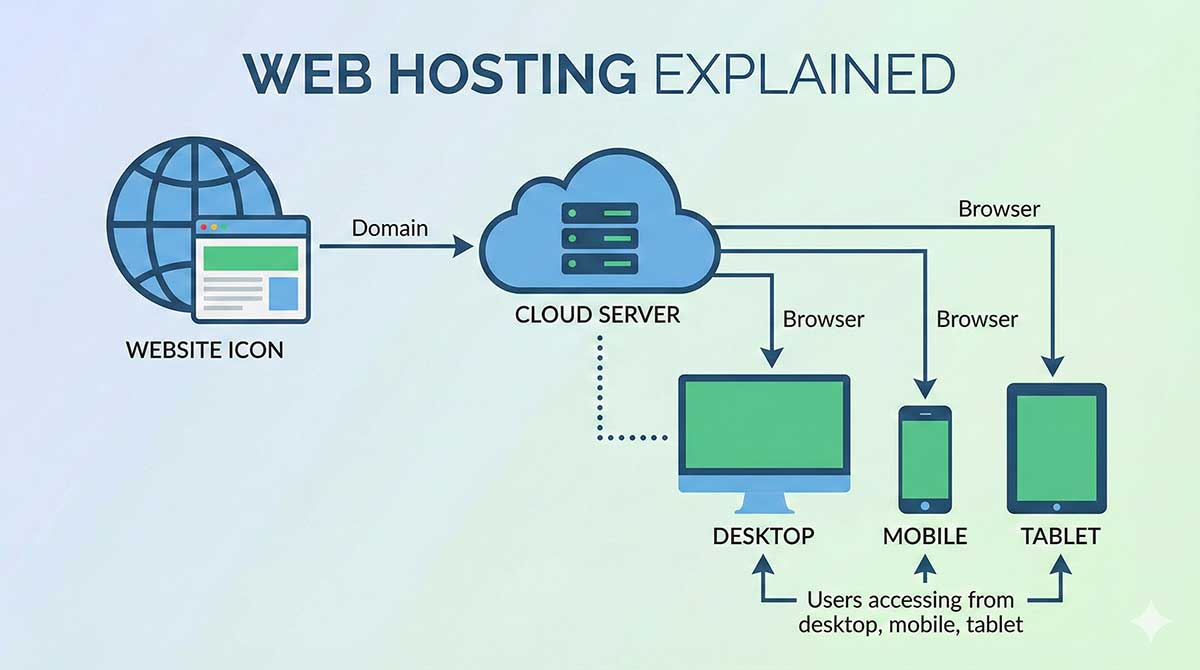
When someone types a website address (domain name) like www.bluechipspace.com into their browser, the browser sends a request to a hosting server. The server processes this request and delivers the website’s files—such as HTML, images, CSS, and scripts—back to the user’s device, allowing the website to load instantly.
Without web hosting, your website cannot be viewed online.
How Web Hosting Works (Step-by-Step)
Understanding how web hosting works helps you make better decisions when choosing a hosting plan.
-
Website Files Are Stored on a Server
Your website files (HTML, CSS, images, databases) are stored on a powerful computer called a web server. -
Domain Name Connects to Hosting
Your domain name is linked to your hosting server using DNS (Domain Name System). -
User Requests the Website
When someone enters your domain name in a browser, a request is sent to the hosting server. -
Server Responds
The server sends the requested files back to the browser. -
Website Loads on the Screen
The browser assembles the files and displays the website.
This entire process happens in milliseconds.
Key Components of Web Hosting
1. Web Server
A web server is a computer or software system designed to store, process, and deliver website files to users. Popular server software includes Apache, Nginx, and LiteSpeed.
2. Hosting Provider
A hosting provider is a company that owns and manages servers and offers hosting services to customers.
Recommended Web Hosting Provider:
👉 Bluechipspace – Reliable, fast, and affordable hosting solutions
🔗 https://www.bluecipsapce.com (recommended provider)
3. Domain Name
A domain name is your website’s address (e.g., example.com). It connects users to your hosting server.
4. Control Panel
A control panel like cPanel or Plesk allows you to manage:
-
Website files
-
Databases
-
Email accounts
-
Security settings
-
Backups
Types of Web Hosting Explained
1. Shared Web Hosting
Shared hosting means multiple websites share resources on one server.
Best For:
-
Beginners
-
Small blogs
-
Business websites with low traffic
Pros: Affordable, easy to manage
Cons: Limited performance
👉 Buy Shared Hosting:
🔗 https://www.bluecipsapce.com
2. VPS Hosting (Virtual Private Server)
VPS hosting provides a virtualized server environment with dedicated resources.
Best For:
-
Growing websites
-
Developers
-
Medium traffic websites
Pros: Better performance, more control
Cons: Slightly technical
👉 Buy Cloud VPS Hosting:
🔗 https://www.bluecipsapce.com
3. Dedicated Server Hosting
You get an entire physical server exclusively for your website.
Best For:
-
High-traffic websites
-
Large businesses
-
Enterprise applications
Pros: Maximum performance and security
Cons: Expensive, requires expertise
4. Cloud Hosting
Cloud hosting uses multiple servers working together.
Best For:
-
Scalable websites
-
Traffic spikes
-
High availability
Pros: Flexible, reliable, scalable
Cons: Can be complex
5. WordPress Hosting
Hosting optimized specifically for WordPress websites.
Best For:
-
Bloggers
-
Business websites
-
WooCommerce stores
Pros: Faster loading, enhanced security
Cons: Limited to WordPress
👉 Buy WordPress Hosting:
🔗 https://www.bluecipsapce.com
6. Reseller Hosting
Allows you to sell hosting services under your own brand.
Best For:
-
Web designers
-
Developers
-
Digital agencies
👉 Buy Reseller Hosting:
🔗 https://www.bluecipsapce.com
Server Operating Systems
Web hosting servers typically run on:
Linux Hosting
-
Most popular
-
Supports PHP, MySQL, WordPress
-
Cost-effective
Windows Hosting
-
Supports ASP.NET, MSSQL
-
Required for Microsoft-based apps
Important Hosting Features to Consider
Bandwidth
Controls how much data your site can transfer. Higher bandwidth supports more visitors.
Storage
Determines how many files and databases you can store.
Uptime Guarantee
Choose hosts offering 99.9% uptime for reliability.
Security Features
-
SSL certificates
-
Firewalls
-
Malware scanning
-
DDoS protection
Customer Support
24/7 technical support is crucial for website stability.
Why Web Hosting Matters for SEO
Web hosting directly affects your website’s:
-
Page speed
-
Uptime
-
Security
-
Search engine ranking
Fast, secure, and reliable hosting improves user experience and SEO performance.
Choosing the Right Web Hosting Plan
Ask yourself:
-
How much traffic do I expect?
-
Is my website static or dynamic?
-
Do I need WordPress optimization?
-
What is my budget?
For most beginners, shared hosting is ideal. Growing websites should upgrade to VPS or cloud hosting.
Recommended Website Designer
For professional website design and development:
👉 WebExpert – Professional Website Designers
🔗 https://www.webexpert.co.in
Best For:
-
Business websites
-
WordPress development
-
E-commerce solutions
-
SEO-friendly design
Final Thoughts
Web hosting is the foundation of every website. Choosing the right hosting provider ensures your website remains fast, secure, and accessible at all times.
Whether you are launching a personal blog, business website, or online store, selecting a reliable hosting provider like Bluechipspace and working with experienced developers like WebExpert will give your online presence a strong and scalable future.
shared hosting, VPS hosting, cloud hosting, WordPress hosting, reseller hosting, hosting server, domain and hosting